What Are the Top 10 Intel 12th Gen Industrial PCs in China?
Choosing an Intel 12th Gen Industrial Computer is not just a matter of selecting the fastest processor. In factory control rooms, inspection stations, and edge cabinets, the machine must also handle heat, vibration, dust, and long operating hours. A processor that looks impressive on a specification sheet may behave differently inside a sealed enclosure. Small details matter.
Intel executive Gregory Bryant described the 12th Gen Intel Core family as bringing “new levels of performance and scaling across the PC market.” That broad claim is useful context, but industrial buyers need to test it against real deployment needs. This guide compares ten industrial PC options available in China, considering processor choices, memory capacity, expansion slots, display and network interfaces, cooling design, and vendor support. The list is a practical comparison, not a guarantee that one model suits every site.
Look closely at the I/O. A line-side computer may need several serial ports and dual LAN, while a vision system may depend on PCIe expansion and steady thermal performance. Ask vendors about operating-temperature limits, product lifecycle, BIOS updates, and service response. Request the exact configuration, too; two machines with the same model name can differ.
There is no perfect shortlist. Product information can change, and published specifications do not replace testing with your own workload. Use these ten candidates as a starting point, then confirm fit with a sample unit, your peripherals, and the environment where it will run.
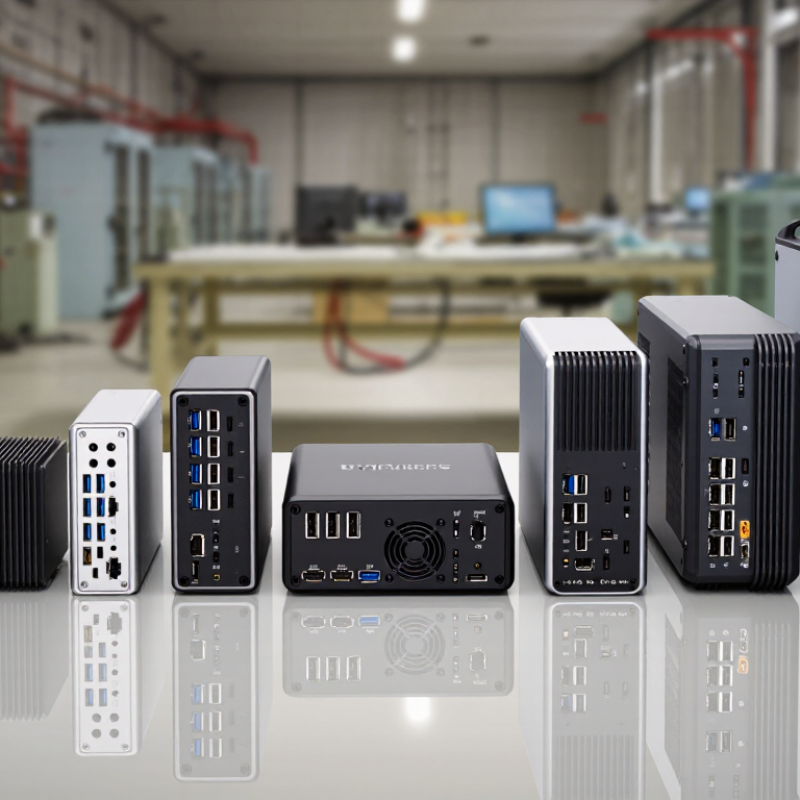
Understanding Intel 12th Gen Industrial PCs in China
An industrial PC built around a 12th-generation processor is more than a desktop computer in a metal case. Its hybrid design combines performance cores with efficiency cores, making software scheduling and workload testing important. Factories may use these systems for machine vision, data collection, line control, or local dashboards. Choose memory and storage around the actual workload: camera streams, databases, and frequent log writes require different amounts of headroom. On paper, everything fits. Reality can be messier.
In China, installation conditions vary between clean control rooms and hot, dusty production floors. Check operating temperature, filter access, mounting options, power input, and vibration resistance before installation. Verify that the available ports match the equipment on site, such as cameras, sensors, and network connections. Request sustained-load tests, not only peak benchmark scores; thermal throttling can occur inside a cramped cabinet. Confirm firmware support, spare-part availability, and repair arrangements with the supplier. A careful pilot on the actual production line remains valuable. It may reveal awkward details, like a connector blocked by a mounting rail. That doubt is useful.
Criteria for Comparing the Top 10 Models
Compare the ten models by sustained performance, not peak processor speed alone. Test the same vision, control, or data-logging workload on each unit. Record response time, CPU temperature, and throttling after a long run. Check memory capacity, storage type, and upgrade access. A faster processor can still disappoint when cooling is restricted inside a sealed cabinet.
Industrial deployments also depend on fit and continuity. Count usable USB, serial, Ethernet, and display ports, then confirm their placement against the actual wiring plan. Review operating temperature, vibration tolerance, power input, and documented EMC test results. IDC’s 2024 Worldwide Edge Spending Guide projected global edge spending at $232 billion that year, a 15.4% rise from 2023. This signals growing edge workloads, but does not prove any single PC is suitable. No ranking is perfect. Published test conditions can differ from a hot factory floor, so treat specifications as starting points, not guarantees.
Tips: Ask for thermal test conditions and a port map before comparing prices. Check whether the unit can run your software and peripherals together. Keep a little room for expansion; real installations change.
Top 10 Intel 12th Gen Industrial PCs in China: Comparison Criteria
Suggested weighting for comparing models; percentages are evaluation priorities, not measured product scores or a product ranking.
Compare each system using documented specifications and test results. Give particular attention to compute performance, memory and expansion options, I/O, and rated operating temperature.
Profiles of 10 Leading Intel 12th Gen Industrial PCs
China’s Intel 12th Gen industrial PC market spans compact controllers, panel computers, and expansion-ready systems. These ten profiles describe useful product types, not a verified sales ranking. Actual processor, memory, and port options vary by configuration.
A compact fanless box suits quiet control cabinets; check its heat limits.
A DIN-rail computer saves space near PLCs.
A rackmount system offers room for add-in cards.
A wall-mount unit works well beside production lines.
A touchscreen panel PC combines operator display and computing in one enclosure.
A stainless-steel panel model supports wipe-down environments, though sealing ratings need careful review.
A multi-display workstation helps monitor several process screens.
A rugged edge computer can collect sensor data close to machines.
A vehicle-mounted system needs secure mounting and stable power.
An expansion-focused box serves projects requiring serial, network, or digital I/O ports.
For each profile, buyers should compare sustained performance, not just peak processor speed. Check operating temperature, vibration tolerance, storage options, and service access against the installation site. Ask for test conditions and documentation before committing; product pages rarely answer every question.
Small details matter. A port placed on the wrong side can complicate a crowded cabinet. One limitation deserves attention: “industrial” does not guarantee suitability for every factory, and this overview cannot replace a hands-on compatibility check.
Key Specifications, Connectivity, and Expansion Options
A useful comparison of ten 12th-generation industrial PCs starts with the board, not the processor name. Check memory type and capacity, thermal limits, and whether the system can run continuously in a dusty cabinet. Depending on the processor and motherboard, platforms may support DDR4 or DDR5 memory and PCIe 5.0 expansion. PCI-SIG specifies PCIe 5.0 at 32 GT/s per lane, but the available slots and lane allocation vary by design. IDC’s 2024 Worldwide Edge Spending Guide estimated global edge spending at $232 billion, underscoring demand for capable local computing.
Connectivity determines how well a PC fits a real production line. Look for the actual count of Ethernet ports, USB ports, serial interfaces, and display outputs—not just the maximum listed in a product brief. Dual Ethernet can separate machine traffic from plant networks; serial ports still matter for legacy controllers. For expansion, compare M.2 and SATA storage options, PCIe slot sizes, and accessible SIM or wireless modules. USB-IF’s USB 3.2 specification allows up to 20 Gbps, though implementation and cable choice affect practical performance. Still, impressive specifications can mislead.
Tips: Ask for the port map and expansion-slot lane details before ordering. Check clearance around the heatsink, too; a card that fits on paper may block airflow in a compact enclosure.
Choosing a Model for Different Industrial Applications
What Are the Top 10 Intel 12th Gen Industrial PCs in China?
Choosing a Model for Different Industrial Applications
The right industrial PC depends on its workload, not just its processor. For machine vision, check that the system supports the required camera interfaces and can sustain image processing without thermal throttling. A compact fanless unit may suit a dusty inspection station, but limited expansion can become a problem later. Heat matters. For a factory HMI, prioritize dependable display connections, responsive touch input, and easy access for maintenance.
For edge analytics, compare memory capacity, storage options, and room for compatible accelerator cards. A control cabinet may need a wide operating temperature range, secure mounting, and clear cable routing. Count the ports your actual equipment needs, including serial connections and network interfaces. A model with impressive specifications can still be a poor fit if its chassis blocks airflow or servicing takes too long. Check the full configuration, not just the product label, and ask about component availability.
Tips: Write down the devices, software, and environmental conditions before shortlisting candidates. Test a sample under real workloads when possible. Measure temperatures during a full shift, not just a quick startup. One overlooked detail can matter. A neat specification sheet is useful, but field conditions are rarely neat.