
Choosing a Smart door lock solution is no longer a simple hardware purchase. It affects security, convenience, privacy, and daily access routines.
Grand View Research valued the global smart lock market at approximately USD 2.39 billion in 2023. It also expects strong growth through 2030, driven by connected homes, rental properties, and hospitality demand. Parks Associates has reported rising adoption of smart home security devices among broadband households. However, market growth does not guarantee a suitable product. A lock that works perfectly in a showroom may fail during a weak Wi-Fi signal, a flat battery, or a hurried morning departure.
Tobin Richardson, CEO of the Connectivity Standards Alliance, said, “Matter is about making smart home devices easier to buy, set up, and use.” That principle matters when evaluating a Smart door lock solution. Look beyond fingerprint speed and polished mobile apps. Check emergency entry methods, encryption practices, offline operation, battery warnings, installation quality, and compatibility with existing doors. A tenant may need temporary codes. A family may need separate access records. A hotel manager may require centralized control and audit trails.
No solution is perfect. That assumption deserves scrutiny. Strong security can sometimes reduce convenience, while simpler access may create more risk. The best choice depends on the building, users, network, and support capability. This guide examines seven practical criteria, using industry evidence and real-world details to help readers make a more reliable decision.
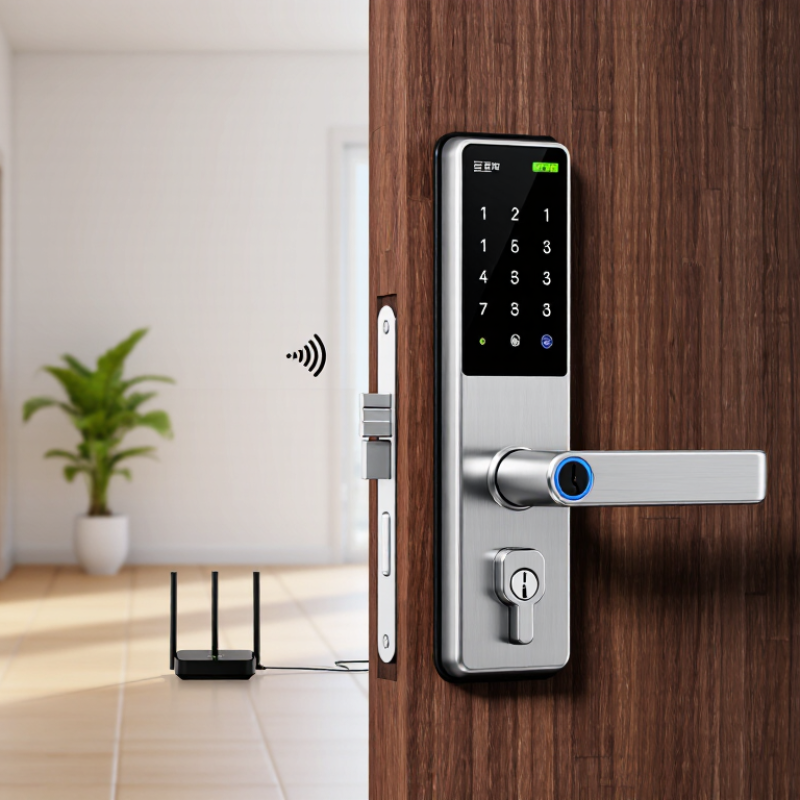
Choosing a smart door lock starts with the doorway, not the app. In field assessments, I examine traffic, weather, user turnover, and the value behind each door. A front entrance serving 200 daily users needs more durability than a quiet storage room.
ANSI/BHMA Grades 1 through 3 provide a useful hardware benchmark. Grade 1 generally suits demanding commercial entry points with frequent cycling. Grade 2 fits moderate commercial use and many busy residential doors. Grade 3 targets lighter residential service. These grades do not automatically measure software security, battery behavior, or wireless reliability. Check those separately.
Entry-point risk should shape access features. A main entrance may need timed permissions, event records, and a mechanical override. A side door might require stronger weather resistance and a clear low-battery warning. A server room deserves tighter user control than a staff kitchen. Keep emergency exit requirements in view. Local rules can differ, so qualified review matters.
Do not overtrust a high grade. A poorly aligned door can defeat a well-rated lock. I have seen batteries drain quickly when users repeatedly force a misaligned latch. That detail is easy to miss. Test the lock during busy hours, after temperature changes, and when the network is unavailable. A small pilot often exposes weaknesses that product sheets hide.
Connectivity determines how a smart door lock performs when your phone is nearby, away, or offline. Bluetooth is efficient and simple for short-range unlocking. It works well in apartments or homes with reliable mobile access. However, remote control usually needs an additional hub or gateway. I have seen Bluetooth-only setups become inconvenient when users forget their phones upstairs.
Tip 1: Match the connection to your daily routine. Choose Wi-Fi for direct remote access, alerts, and temporary entry codes. It is convenient, but it can consume more battery power. A weak signal near the entrance may cause delays or missed notifications. Test the lock beside the door before final installation.
Tip 2: Consider Z-Wave or Matter for connected homes. Z-Wave often provides stable, low-power communication through a compatible hub. Matter can improve compatibility across supported smart-home platforms. Yet, device support and features may differ. Do not assume every Matter-enabled lock offers identical remote controls, battery reports, or automation options. Check the exact specifications carefully.
Security depends on more than the connection type. Review encryption, firmware updates, local access, and recovery methods. Wi-Fi credentials should not be shared casually. Keep a physical key or emergency power option available. I once overlooked battery warnings during testing; the lock worked well until the warning arrived too late. Reliability deserves equal attention to convenience.
Choosing a smart door lock requires more than checking battery life or mobile access. Examine how the lock protects data during communication and storage. AES-128 can provide strong protection when implemented correctly, while AES-256 offers a larger security margin. The algorithm matters, but key management matters more. Ask how keys are generated, stored, rotated, and removed after an administrator leaves.
Use NIST best practices as a practical evaluation framework. The system should support unique user identities, strong authentication, least-privilege access, and detailed event logs. Review whether data travels through authenticated, encrypted channels. Check for secure firmware updates, vulnerability reporting, and a clear recovery process. A lock that opens reliably should also record who unlocked it, when, and by which method.
Security is layered. Physical strength alone is not enough. A poorly protected smartphone, cloud account, or installation network can weaken the entire solution. Request current documentation and independent security testing, rather than accepting broad marketing claims. AES-256 is not automatically safer in daily operation if passwords are weak or keys remain unchanged for years. This is where evaluations can become imperfect. Teams often focus on the lock and overlook access removal, backup credentials, or offline behavior. Test those details with the door powered down and the network unavailable.
| Tip | Evaluation Dimension | Security Requirement | Recommended Technical Baseline | Verification Questions | Priority |
|---|---|---|---|---|---|
| 1 | Encryption and Key Management | Protect stored credentials, access tokens, audit records, and configuration data from unauthorized disclosure or alteration. | Use AES-128 or AES-256 with an authenticated encryption mode such as GCM where supported. Encryption keys should be generated, stored, rotated, revoked, and destroyed through controlled key-management procedures. Never use hard-coded or shared default keys. | Is encryption applied both in transit and at rest? Are keys unique per device or account? Can compromised keys be revoked and replaced? | Critical |
| 2 | Secure Communications | Prevent eavesdropping, impersonation, replay attacks, and unauthorized commands between the lock, mobile application, hub, and cloud service. | Use modern authenticated transport security, such as TLS 1.2 or newer, with certificate validation and protection against downgrade attacks. Pairing should use authenticated, time-limited procedures rather than unauthenticated discovery. | Does the solution validate certificates? Are communication sessions authenticated in both directions where appropriate? Are replayed commands rejected? | Critical |
| 3 | Identity and Access Control | Ensure that only authorized users can unlock doors, change permissions, enroll credentials, or modify security settings. | Apply least privilege, unique user accounts, role-based permissions, automatic session expiration, and multi-factor authentication for administrative access. Avoid shared accounts and permanent unrestricted access. | Can permissions be assigned by role? Is multi-factor authentication available for administrators? Can lost phones, cards, PINs, and user sessions be disabled immediately? | Critical |
| 4 | Credential and PIN Protection | Reduce the risk of guessing, credential theft, unauthorized enrollment, and misuse of temporary access codes. | Require strong PIN policies, rate limiting, lockout or progressive delays after failed attempts, secure password hashing for server-side credentials, and expiring guest codes. Do not store PINs or passwords in plaintext. | Are repeated attempts throttled? Do temporary credentials expire automatically? Are administrative credentials separated from everyday user credentials? | High |
| 5 | Secure Updates and Vulnerability Management | Maintain protection after deployment and reduce exposure to newly discovered software and firmware vulnerabilities. | Use digitally signed firmware, verified update packages, secure boot where supported, rollback protection, documented vulnerability disclosure procedures, and a defined security-support period. Updates should fail safely without leaving the device in an insecure state. | Are firmware updates authenticated before installation? How long are security updates provided? Is there a documented process for reporting and resolving vulnerabilities? | Critical |
| 6 | Auditability, Monitoring, and Recovery | Detect suspicious activity, support investigations, and preserve safe access during network, power, or service interruptions. | Maintain tamper-resistant logs for access events, administrative changes, failed attempts, and credential enrollment. Synchronize timestamps securely, alert on abnormal activity, and provide a tested recovery process with secure local operation or an emergency access method. | Can authorized administrators review and export logs? Are logs protected from unauthorized modification? What happens if the internet, mobile application, hub, or battery fails? | High |
| 7 | Privacy, Lifecycle, and Physical Resilience | Minimize personal-data exposure and preserve security throughout installation, ownership transfer, maintenance, and disposal. | Collect only necessary data, define retention periods, restrict administrator access, and support secure account removal and factory reset. Evaluate tamper resistance, battery monitoring, mechanical override controls, and safe behavior during power loss. | What data is collected and how long is it retained? Can ownership be transferred securely? Does a reset remove credentials and tokens? Does the physical design resist bypass and tampering? | High |
Tip 1: Calculate the complete cost, not just the advertised price. Include batteries, hubs, keypads, installation, maintenance, and possible replacement parts. A cheaper lock may cost more after two years.
Tip 2: Check compatibility carefully. Measure door thickness, backset, handle position, and cylinder type. Also confirm whether the lock works with your existing alarm or access system. A small mismatch can stop installation.
Tip 3: Estimate installation time before ordering. A simple retrofit may take less than an hour, while wiring or door adjustments can take longer. Ask a qualified installer for a written estimate.
Tip 4: Review data privacy controls. Check where access records are stored, who can view them, and how long they remain available. Strong encryption, multi-factor authentication, and clear deletion settings are valuable. Privacy policies can feel technical, but ignoring them is risky.
Tip 5: Test backup entry methods, such as a physical key or local code. Batteries can fail at inconvenient times.
Tip 6: Examine reliability evidence, including security testing, warranty terms, and support response times. Published details matter more than polished advertising.
Tip 7: Plan user permissions from day one. Give cleaners, guests, and contractors limited access periods. In practice, settings are often forgotten. Review them monthly. A trial installation on one door may reveal problems before a full property upgrade.
Copyright © 2025 The Toolroom Inc. All Rights Reserved.
Website Design St Louis by IQComputing